.png)


- Out-of-Stock
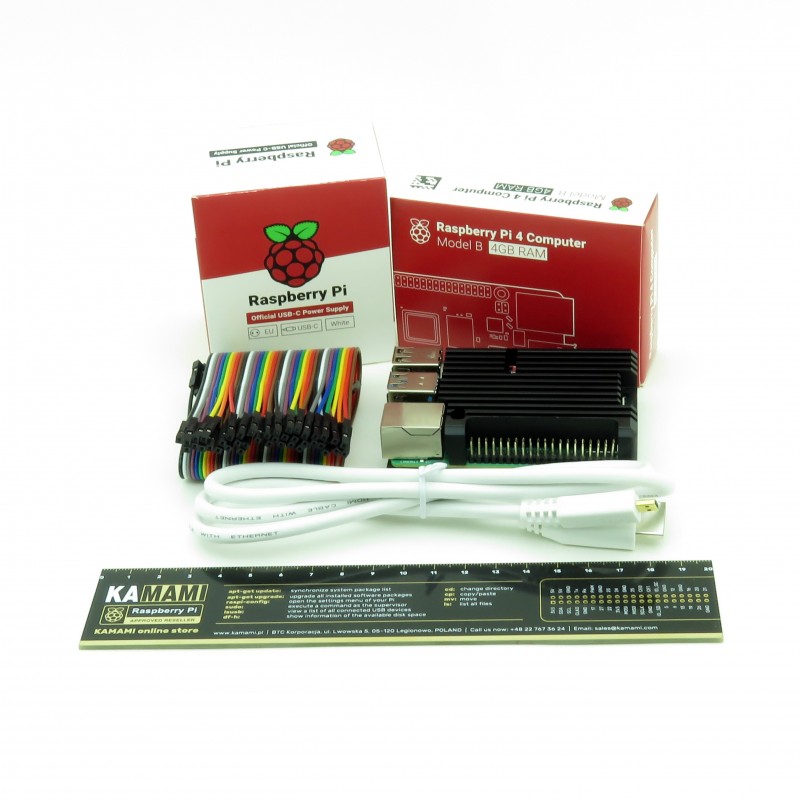

Kit containing Raspberry Pi Pico and Raspberry Pi 4B 4 GB. The kit also includes the necessary connectors, cables, power supply and housing - heat sink
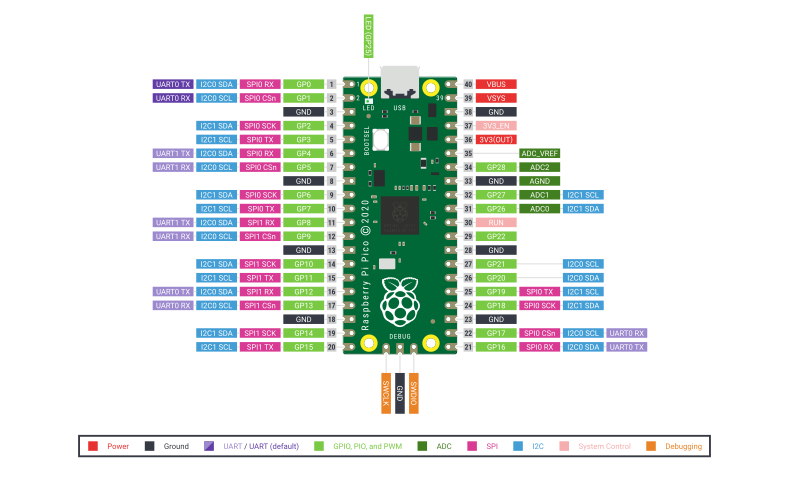
The Raspberry Pi Pico is the first board to feature a microcontroller designed by the Raspberry Pi foundation. The chip that is the heart of this board has been equipped with two ARM Cortex M0+ cores operating at a frequency of 133 MHz, 256 KB of RAM and 30 GPIO ports. The microcontroller itself is not equipped with flash memory, but on the board there is an external memory with a capacity of 2 MB connected via the QSPI interface. The platform supports the popular MicroPython and C/C++ programming languages. Programs can be uploaded to memory via the USB interface in mass storage mode or by using an external programmer that supports the SWD interface.

Kamami is the official distributor of Raspberry Pi minicomputers and dedicated accessories.
 |
MicroPythonMicroPython is a special version of the Python 3 programming language, prepared to run directly on embedded systems such as the Raspberry Pi Pico. The version prepared especially for the RP2040 microcontroller, supports REPL, an interactive shell that allows you to execute scripts, typing into the console and viewing the results of the program in it. Thanks to this technology, it is also possible to save the program in flash memory. |
C/C++To facilitate the programming of the RP2040 microcontroller in C / C ++, the Raspberry Pi Foundation has prepared an official SDK toolkit that can be integrated with popular IDEs such as Visual Studio Code or Eclipse. The entire environment configuration process is described in the Getting started with Raspberry Pi Pico document. |
 |
|
|
Uploading the program via the USB interfaceThe Raspberry Pi Pico can be programmed via the USB interface, it can be done in two ways. The first is the USB mass storage mode, to program the board in this way, press and hold the BOOTSEL button, and then connect the board to the computer with a USB cable. The device will be recognized as mass memory to which you can upload the program in the same way as copying files to a pendrive. After uploading the program, the microcontroller will automatically reset and start the uploaded program. This method is suitable for uploading programs written in C / C ++ or for uploading the MicroPython interpreter. The second way works only with programs written in MicroPython and requires prior loading of the interpreter using the first method. This method consists in saving the program layout transferred with REPL in the memory. |
When programming in C/C++, there is often a need to repeatedly test the program. Loading a program via USB requires repeating the procedure every time, disconnecting the board from the computer, pressing the button and connecting the board, and then finding the compiled program and copying it to memory. The whole thing takes quite a long time, but fortunately it can be simplified using an external programmer with SWD interface. Programming via SWD is much faster, you only need to connect the programmer once with a 3-pin connector and power supply e.g. via USB and you can upload programs directly from the IDE. In addition, you can debug the program in this way and efficiently find any errors in the code by running it line by line.
The Raspberry Pi Pico is designed to be programmed directly with the Raspberry Pi 4B or 400. The manufacturer has prepared detailed instructions for setting up programming environments and ready-made configuration scripts. Pico can be programmed from the Raspberry minicomputer both via USB and via SWD. The big advantage of this solution is no need to use an external SWD programmer. Pico ports can be connected to RPI ports. To ensure a stable connection, you should connect Pico directly to the minicomputer, the use of the contact plate may introduce interference.
To use the full potential of programming environments, it is recommended to use minicomputers with min. 4 GB of RAM.
The Raspberry Pi Foundation has prepared the Picoprobe application that allows you to change RPI Pico into an SWD programmer and a USB - UART converter. Thanks to this, you can program the RP2040 without the need for an SWD programmer, using only the second board with the RP2040 microcontroller.
Warning!
The Raspberry Pi Pico board does not include goldpin connectors and a microUSB cable. Our offer includes connectors for GPIO 1x40 (they can be easily divided into two 1x20 connectors) and a connector 1x3 for a programmer. There are also ready-made kits containing connectors, a microUSB cable and / or a programmer / minicomputer RPI 4B.
Manufacturer
Responsible person
No product available!
No product available!
No product available!
No product available!
No product available!
No product available!
No product available!
No product available!
No product available!
No product available!
No product available!
No product available!
No product available!
No product available!
No product available!
No product available!
Kit containing Raspberry Pi Pico and Raspberry Pi 4B 4 GB. The kit also includes the necessary connectors, cables, power supply and housing - heat sink